
01
Add the truth
Upload approved Figma exports, screenshots, or reference URLs.
Drop in the approved design and a screenshot of the build, or paste direct image links. QA Troll flags every difference in spacing, color, and type, then writes fixes your developers can ship right away.
$20/month · Cancel anytime · Built for designers, developers, and QA
Visual report
7.8% drift+12px Y
8px → 12px
#A3A3A3
mt-3 rounded-xl text-muted-foregroundFrom reference to exact fix
Upload approved Figma exports, screenshots, or reference URLs.
Pair each screen with its coded page, screenshot, or accessible URL.
Review measured drift and implementation guidance for your stack.
Before and after
Checking a page by hand, side by side with the design, takes about an hour. QA Troll checks all 20 pages in about 10 minutes.
A real QA pass
Maya is the product designer at Ember Roasters. Her developer shipped the new homepage to staging and asked, “Does it match?” It looks close. Instead of squinting between two tabs, she drops the approved Figma export and a staging screenshot into one QA Troll flow.
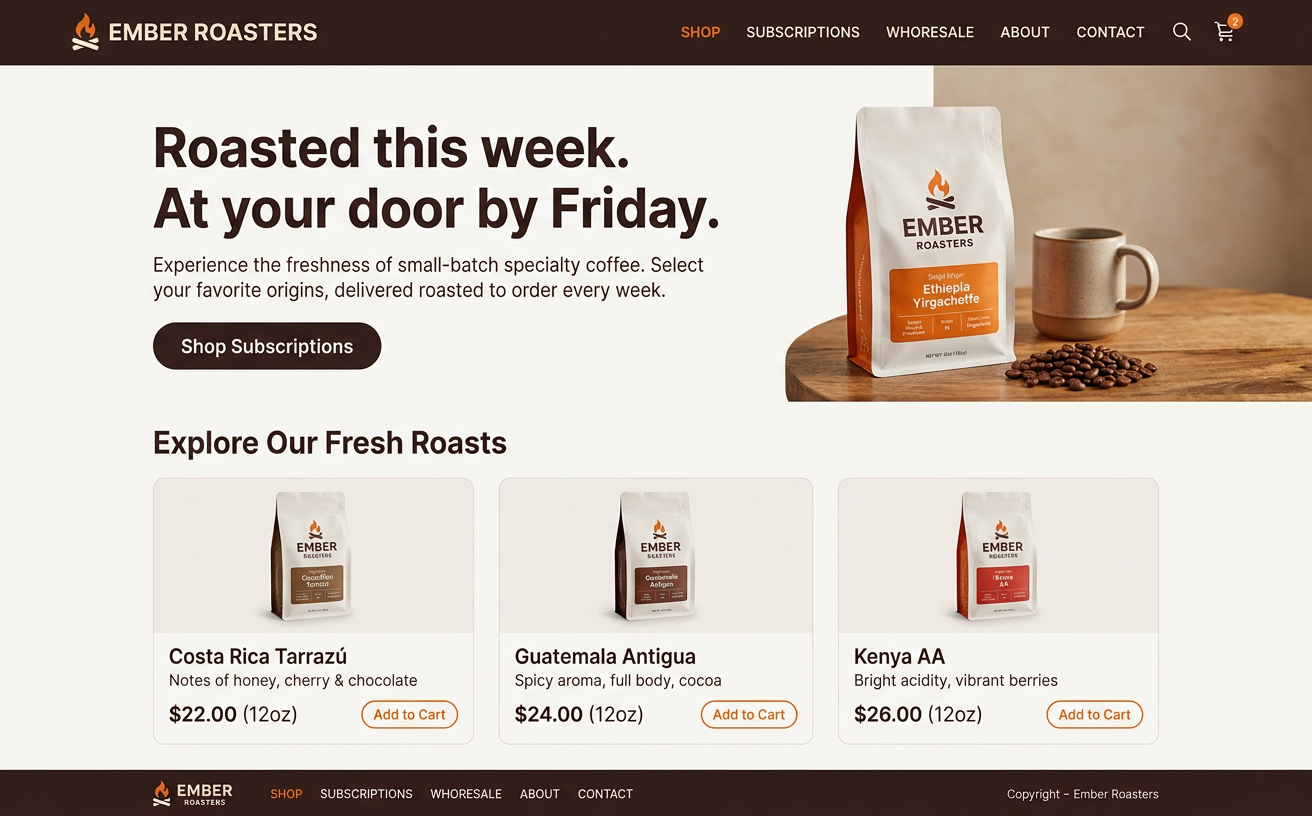
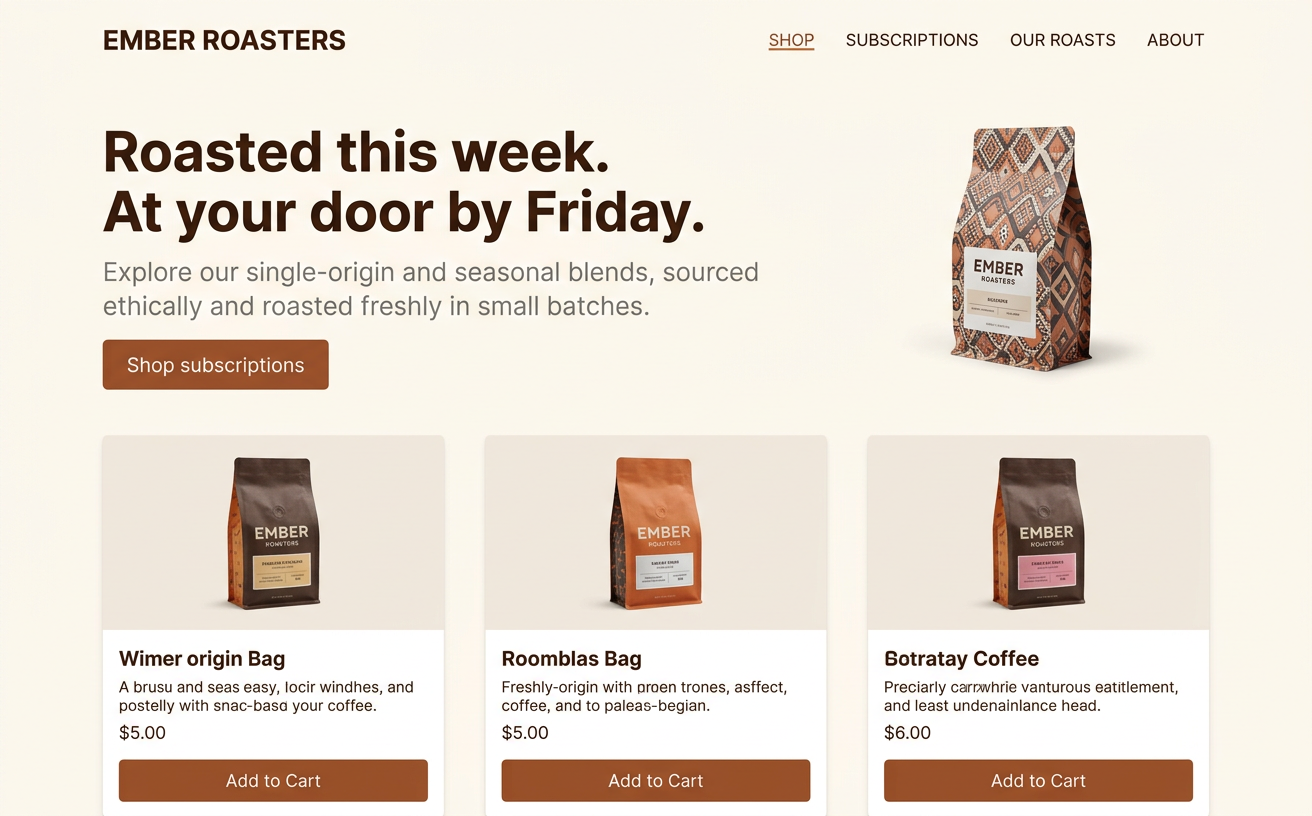
Landing page · 2 screens · 1 flow
3.2%
visual difference found
Nothing she'd have caught with confidence by eye, and all of it measured. She sends the checklist, the developer fixes it, and the rerun shows 0% difference.
Hero padding-top is 64px in the build vs 50px in design.
pt-12 → pt-[50px]Text renders #7A726B; the design specifies #4A3F38.
text-stone-500 → text-stone-700Corner radius is 6px; the approved design uses full pill.
rounded-md → rounded-fullGaps measure 40px and 42px; design is a consistent 32px.
gap-10 → gap-8Pricing
Less than an hour of review time a month. Cancel anytime.
QA Troll Pro
$20/ month
Protect the intent of the approved file without writing another vague annotation.
Get measured offsets, colors, sizing, and code guidance instead of a subjective review.
Keep every screen, source, result, and rerun together in one repeatable workspace.
FAQ
What you can upload, how comparisons work, and what your developers get back.
Upload any standard image: PNG, JPG, WebP, GIF, or AVIF. PNG works best for design QA because it is lossless, so compression artifacts are not mistaken for visual differences. Keep each file under 4.5 MB.
Yes. Screenshots are the most common input. Any image of the approved design and any image of the current build can be compared, whether they come from Figma, Sketch, Adobe XD, a browser, or a device simulator.
Export the frame from Figma as a PNG at the same width as the page you are testing, then upload it as the design reference. You can also paste a direct HTTPS link to an exported Figma image.
Links must point directly to an image served over HTTPS, such as a hosted screenshot. To check a live, staging, or localhost page, take a full-page screenshot in your browser and upload it. Private network and localhost URLs cannot be fetched.
No, but matching sizes give the most accurate results. QA Troll scales the build image to the dimensions of the design reference, up to 1920 × 1600 pixels. Capture both at the same viewport width (desktop, tablet, or mobile) to avoid false differences.
It measures pixel-level drift and reports real differences in layout, spacing, alignment, typography, color, corner radius, and content. Each finding includes a severity, a measurement, and a suggested fix.
Choose Tailwind CSS, plain CSS, React, Vue, SwiftUI, or Flutter for each project, and every fix is written for that stack so developers can paste it straight into their code.
Yes. Set a screen to the mobile or tablet viewport and upload screenshots from iOS, Android, or a device simulator. SwiftUI and Flutter guidance is available for native apps.
Yes. Group screens into flows, such as onboarding or checkout, and run the whole batch in one pass. Every screen, source, and result is saved together so you can rerun it after fixes ship.
Visual regression tools compare a build against its previous version. QA Troll compares the build against the approved design, so it catches drift that was never correct in the first place.
Yes. Uploads are stored in private storage tied to your account and are only used to run your comparisons. They are never shown publicly.
QA Troll Pro is $20 per month and includes unlimited projects, flows, and reruns. There is no contract, and you can cancel anytime.
QA Troll Pro · $20/month
Create a project, add your references, and turn visual differences into fixes your developer can ship.